Orange ISP ONU XGS-WAS-110
Orange tricks
Notes from the part of the home network where optics, OMCI, VLANs, DHCP options and ISP assumptions meet.
KISS when possible. Preserve the logs when not.
What this note is about
XGS-PON, SFP+ ONU stick, 8311 firmware, VLAN/OMCI verification and the usual Orange-flavored archaeology.
This is a cleaned-up blog version of my working notes, but intentionally not a simplified rewrite.
All commands, code blocks, device-specific values, references and troubleshooting hints from the original note are preserved below.
The objective is simple: make the document easier to read without turning hard-earned operational details into vague advice. ISP replacement setups are already full of ghosts; removing useful notes would only make the ghosts angrier.
Read this first
This kind of setup touches several layers at once:
fiber / optics
PON registration
OMCI identity
VLAN provisioning
Ethernet handoff
DHCP client behavior
routing / firewalling
When something fails, debug in that order. Starting with firewall rules before the ONU/ONT is properly associated is a very efficient way to lose an evening.
Original technical notes, preserved and reorganized only lightly
Source note: Orange ISP ONU XGS WAS-110.md
Orange ISP ONU XGS WAS-110
Links
https://akhamar.github.io/orange-xgs-pon/30_was_onu.html
https://akhamar.github.io/orange-xgs-pon/
https://www.fibermall.com/sale-460693-xgspon-onu-sfp-stick.htm
Orange DHCP conformité protocolaire 2023 - lire depuis le début du sujet
djGrrr/8311-was-110-firmware-builder
The chipset is MaxLinear PRX126 made by Azores.
Do not use any NIC to host the ONU as above 7800-8000Mbps the ONU will draw too much power and enter a deep emergency lock state. Use a switch instead (using trunk vlan832).
To be able to flash the WAS-110 inside a Mikrotik switch without to have to connect the fiber (and power-on the ONU), just disable rx-loss on the port :
/interface ethernet set [ find default-name=sfp-sfpplusX ] sfp-ignore-rx-los=yes
Basics
For memories, the good SFP power values should be in the following ranges :
-
GPON : TX 0.5 -> 5 dBm
RX -30 -> -8 dBm -
XGSPON : TX 4 -> 9 dBm RX -28 -> -9 dBm
Introduction
The WAS-110 firmware can be switched to a community firmware that allow a lot of customization and control over the ONU.
Note: After 3 consecutive power failures (or like that), the ONU automatically switch to failsafe mode. To exit from this mode, just power cycle 1 time (power off, power on).
Material/Software validation
Router (soft):
- OpnSense
- Debian
- OpenWrt
Router (hardware):
- tp-link er8411
- mikrotik CCR2004
- Banana Pi BPI-R4
NIC:
X710-DA2 (some seem to have issues, I didn’t)X520-xxMellanox MT27710 [ConnectX-4 Lx]
Do not use any NIC to host the ONU as above 7800-8000Mbps the ONU will draw too much power and enter a deep emergency lock state.
Use a switch instead (using trunk vlan832)
Switch:
- Probably any
Media converter:
- MC220L v2.x
- MC220L v3.x
ONU cross flash
List of essentials
Available version of the firmware
The explanations and original github repository are available here
You will need the ability to use 7zip (windows or linux) to extract the firmware and a console able to connect and transfert using an ssh/scp command.
Preparing the host
Make sure you are on the ONU host machine. You will need an address on the 192.168.11.0/24 network. The ONU is accessible on the IP 192.168.11.1
You can test the connectivity by pinging the ONU.
Preparing the original ONU firmware
Credentials
Web credentials (HTTP)
The original firmware login/password that come with the WAS-110 vary depending on the ONU version.
<= v1.0.20
| Username | Password |
|---|---|
| admin | QsCg@7249#5281 |
| user | user1234 |
v1.0.21+ (or root of community firmware from djGrrr/8311-was-110-firmware-builder)
| Username | Password |
|---|---|
| admin | BR#22729%635e9 |
| user | user1234 |
community firmware from djGrrr/8311-was-110-firmware-builder
There is no root password, you must define a password with passwd command !
Shell credentials (SSH)
The original firmware login/password that come with the WAS-110 vary depending on the ONU version.
<= v1.0.20
| Username | Password |
|---|---|
| root | QpZm@4246#5753 |
v1.0.21+
The root password is undisclosed at this time, use the suggested exploit below to gain root privileges
Run the following command(s) to temporarily change the root password to root
curl -s -o null "http://192.168.11.1/cgi-bin/shortcut_telnet.cgi?%7B%20echo%20root%20%3B%20sleep%201%3B%20echo%20root%3B%20%7D%20%7C%20passwd%20root"
community firmware from djGrrr/8311-was-110-firmware-builder
There is no root password, you must define a password with passwd command !
Configuring the ONU to accept SSH
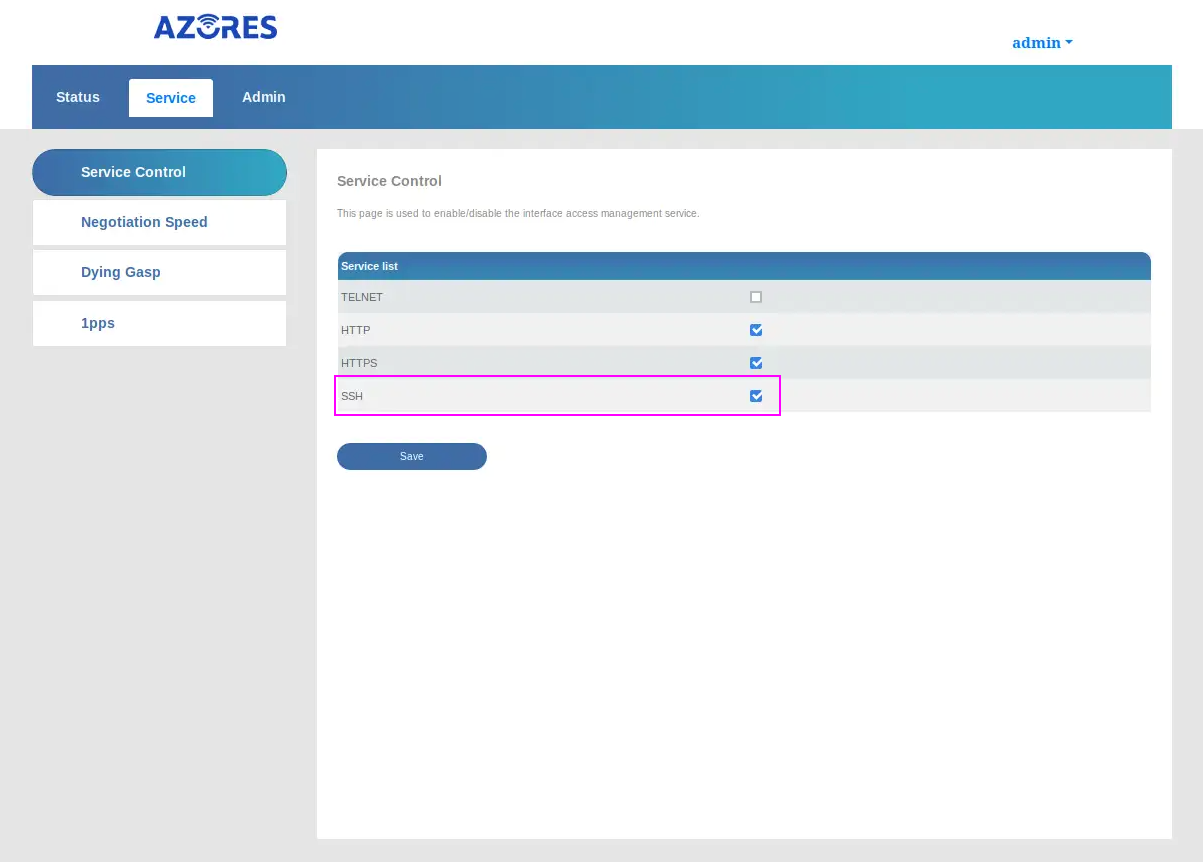
Navigate to the service controle panel to activate SSH. Use the admin credential above, matching your version, to login on the ONU.
Activate SSH and Save.
Preparing the firmware
Extract the firmware
windows
7z x WAS-110_8311_firmware_mod_<version>_basic.7z
linux
7z x WAS-110_8311_firmware_mod_<version>_basic.7z
Installing the firmware
In the folder where you extracted the community firmware, do the following.
windows
Prior to Windows 11 Build 22631.4391 (KB5044380) and Windows 10 Build 19045.5073 (KB5045594)
scp -oHostKeyAlgorithms=+ssh-rsa -oPubkeyAcceptedKeyTypes=+ssh-rsa local-upgrade.tar root@192.168.11.1:/tmp/
ssh -oHostKeyAlgorithms=+ssh-rsa -oPubkeyAcceptedKeyTypes=+ssh-rsa root@192.168.11.1 "tar xvf /tmp/local-upgrade.tar -C /tmp/ -- upgrade.sh && /tmp/upgrade.sh -y -r /tmp/local-upgrade.tar"
New Windows build
scp -O -oHostKeyAlgorithms=+ssh-rsa -oPubkeyAcceptedKeyTypes=+ssh-rsa local-upgrade.tar root@192.168.11.1:/tmp/
ssh -oHostKeyAlgorithms=+ssh-rsa -oPubkeyAcceptedKeyTypes=+ssh-rsa root@192.168.11.1 "tar xvf /tmp/local-upgrade.tar -C /tmp/ -- upgrade.sh && /tmp/upgrade.sh -y -r /tmp/local-upgrade.tar"
linux
scp -O -oHostKeyAlgorithms=+ssh-rsa -oPubkeyAcceptedKeyTypes=+ssh-rsa local-upgrade.tar root@192.168.11.1:/tmp/
ssh -oHostKeyAlgorithms=+ssh-rsa -oPubkeyAcceptedKeyTypes=+ssh-rsa root@192.168.11.1 'tar xvf /tmp/local-upgrade.tar -C /tmp/ -- upgrade.sh && /tmp/upgrade.sh -y -r /tmp/local-upgrade.tar'
After a reboot of the ONU, you can verify that it as been upgraded to the community version.
Verify
Navigate to the ONU community interface. On the first connection, you will be asked to set a new root password. Please remember it, it will be important to configure the ONU later on.
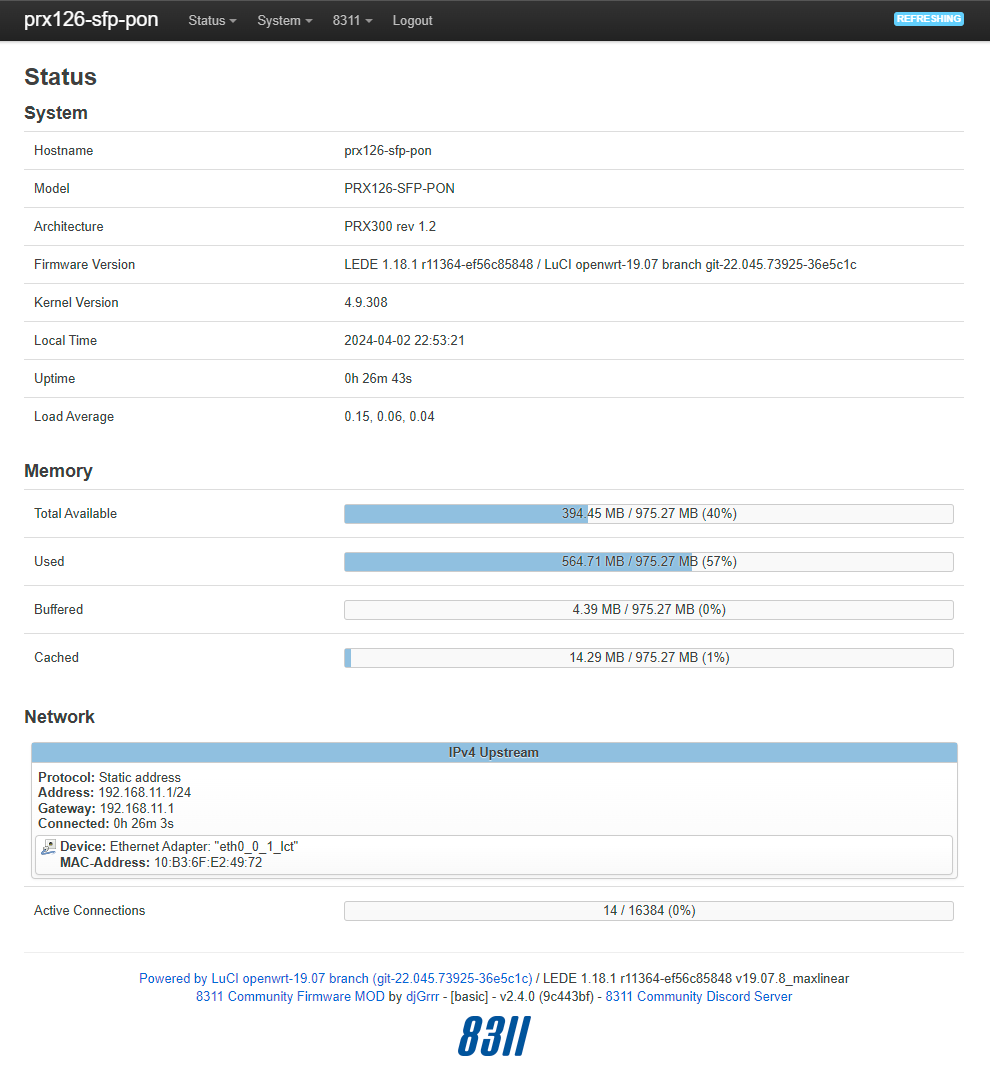
Upgrading community firmware
Just extract local-upgrade.tar from WAS-110_8311_firmware_mod_<version>_basic.7z, go to the web interface > 8311 menu > Firmware > Upload > Install > Reboot (wait about 2 min)
ONU Configuration
Configuring the ONU
Navigate to the ONU community interface and login.
On the menu and under 8311 go to Configuration.
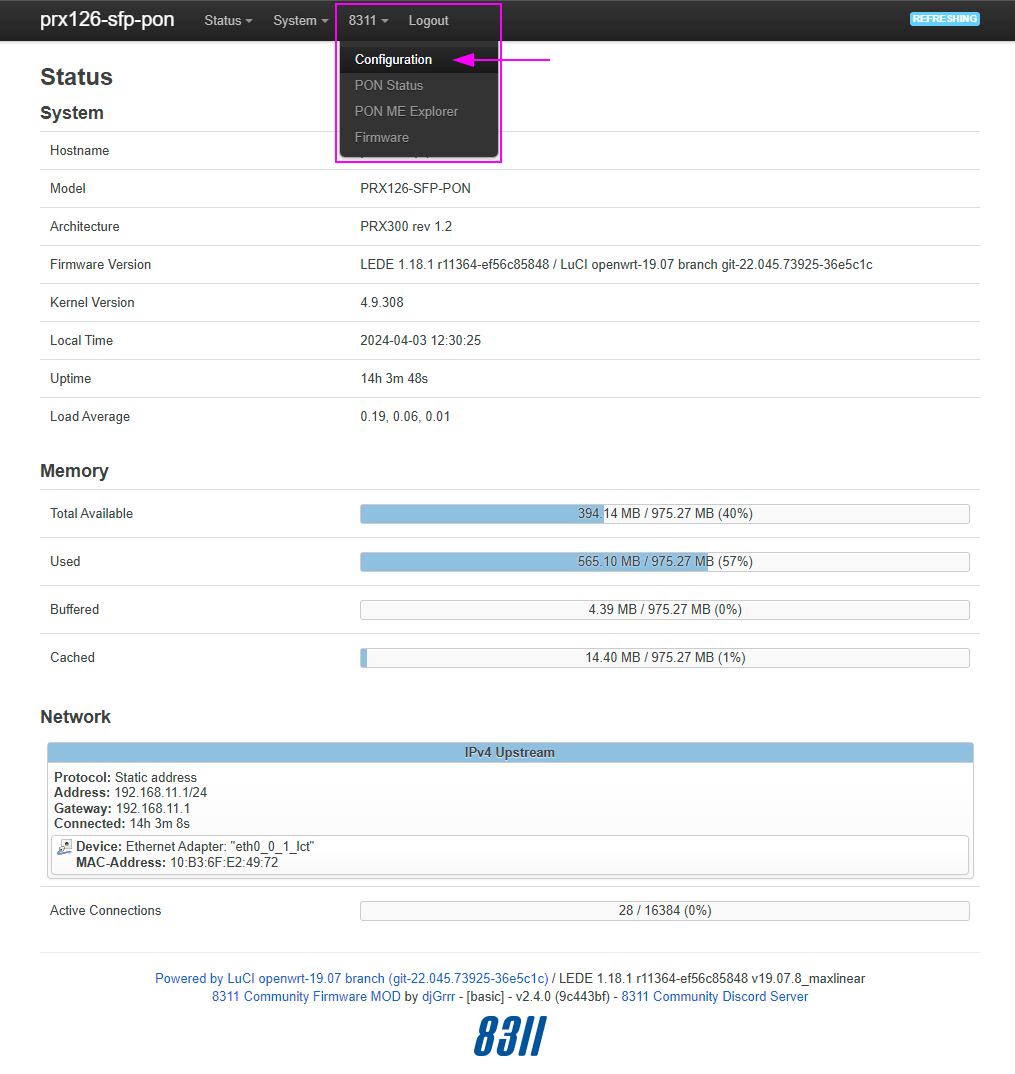
PON
Set your LiveBox values and save.
You will need to set the PON Serial Number, the Vendor ID and the Hardware Version.
| PON Serial Number | YOUR_LIVEBOX_ONT_SERIAL | | — | — | | Vendor ID | SMBS | | Hardware Version | SMBSXLB7400 | WARNING : The very last version of Livebox 7 (with wifi 7) seems to have a different Hardware Version. To be sure, just verify yourself in the Livebox interface…
| PON Serial Number | YOUR_LIVEBOX_ONT_SERIAL |
|---|---|
| Vendor ID | SMBS |
| Hardware Version | SMBSXLB7270300 |
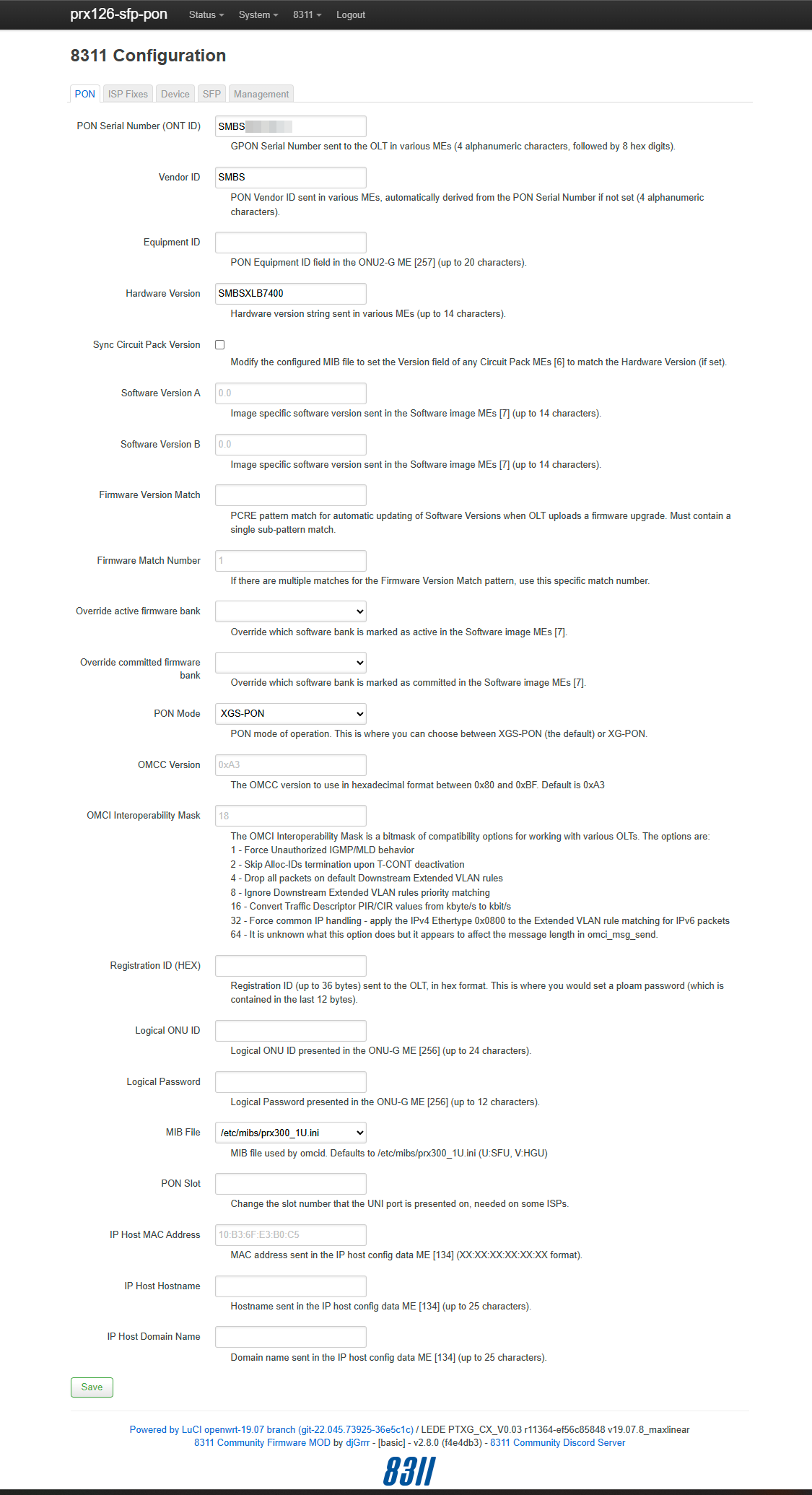
Note: DO NOT FORGET TO REPORT THE MAC ADDRESS OF LIVEBOX TO DHCP CLIENT VLAN 832 INTERFACE
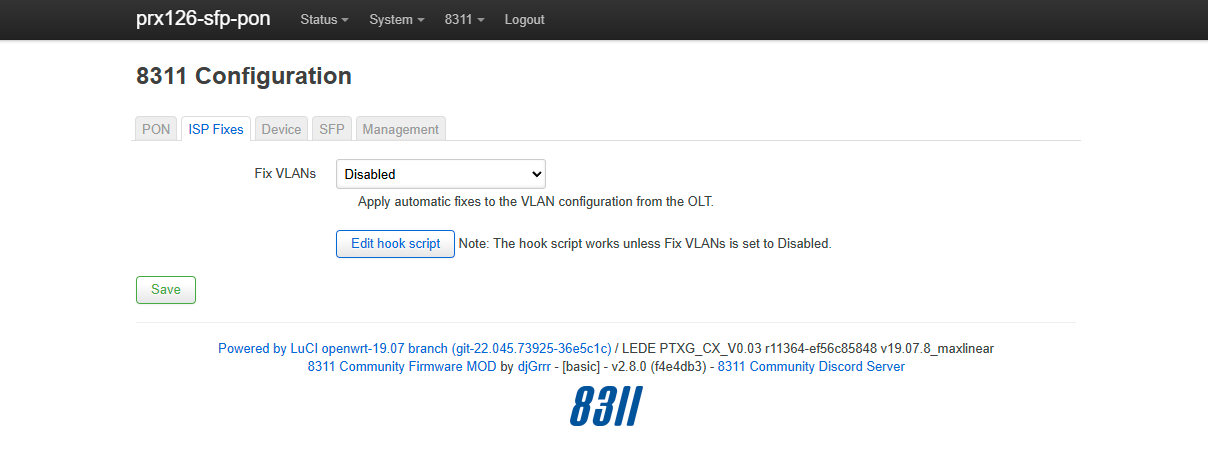
ISP Fixes
Unset the Fix VLANs and save.
ONU Verify
Navigate to the ONU community interface and login.
On the menu and under 8311 go to PON Status.
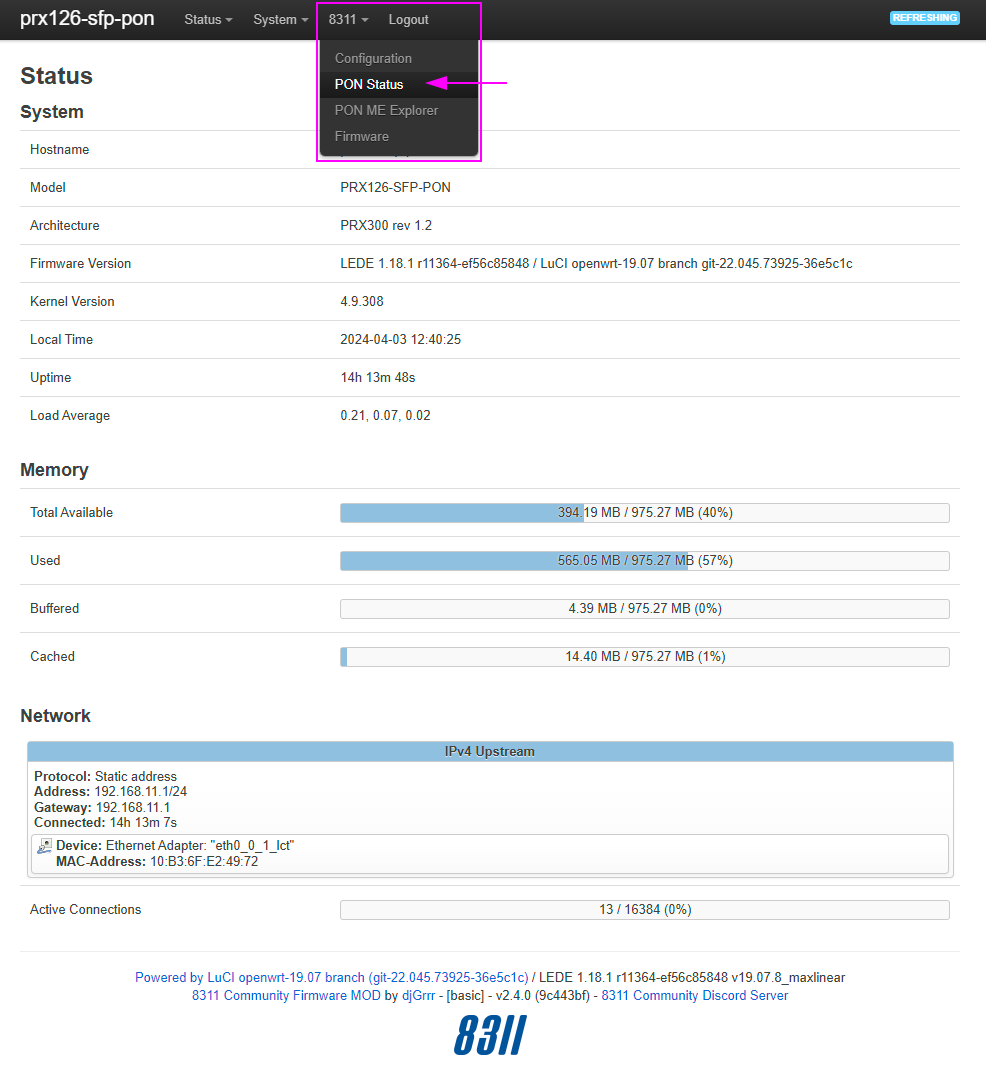
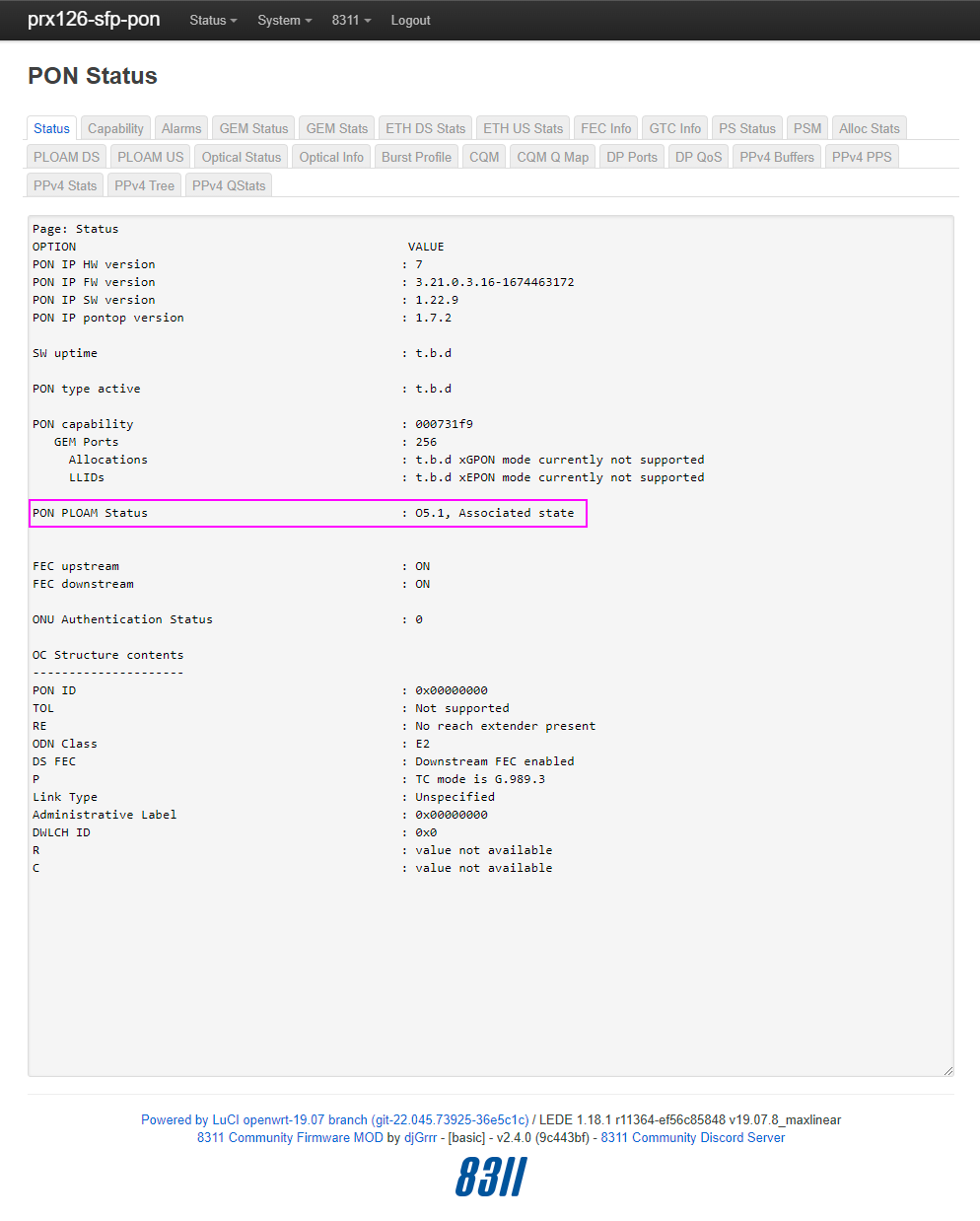
You should see the O5.1, Associated state status.
Now, just go to the menu 8311 > VLAN Tables, you should see expected VLAN tables.
If it is not the case and the PON Status show O5.1, Associated state, just reboot the SFP via the menu System > Reboot and check again.
ONU Troubleshoot
Failsafe mode
After 3 consecutive power failures (or like that), the ONU automatically switch to failsafe mode. To exit from this mode, just power cycle 1 time (power off, power on).
Verify your VLANs
This is now directly available on the ONU http interface starting
2.7.0+version of the firmware.
Just go to the menu 8311 > VLAN Tables, you should see the following.
If it is not the case and the PON Status show O5.1, Associated state, just reboot the SFP via the menu System > Reboot and check again.
------------------------
Filter Outer		Filter Inner		Filter Other	Treatment Outer			Treatment Inner
Prio	VID	TPIDDEI	Prio	VID	TPIDDEI	EthTyp	ExtCrit	TagRem	Prio	VID	TPIDDEI	Prio	VID	TPIDDEI
14	4096	5	14	4096	0	0	0	3	15	0	0	15	4096	3
15	4096	0	0	851	5	0	0	1	15	0	0	0	852	2
15	4096	0	1	851	5	0	0	1	15	0	0	1	852	2
15	4096	0	2	851	5	0	0	1	15	0	0	2	852	2
15	4096	0	3	851	5	0	0	1	15	0	0	3	852	2
15	4096	0	4	851	5	0	0	1	15	0	0	4	852	2
15	4096	0	5	851	5	0	0	1	15	0	0	4	852	2
15	4096	0	6	851	5	0	0	1	15	0	0	5	852	2
15	4096	0	7	851	5	0	0	1	15	0	0	7	852	2
15	4096	0	8	832	5	0	0	1	15	0	0	8	2800	2
15	4096	0	8	835	5	0	0	1	15	0	0	8	835	2
15	4096	0	14	4096	5	0	0	3	15	0	0	15	4096	2
15	4096	0	15	0	5	0	0	3	15	0	0	15	0	2
15	4096	0	14	4096	0	0	0	0	15	0	0	15	0	0
14	4096	0	14	4096	0	0	0	0	15	0	0	15	0	0


Extended VLAN table 257
------------------------
Filter Outer Priority:		14	(Default filter when no other two-tag rule applies)
Filter Outer VID:		4096	(Do not filter on the outer VID)
Filter Outer TPID/DEI:		5	(TPID = Input TPID, ignore DEI)
Filter Inner Priority:		14	(Default filter when no other one-tag rule applies)
Filter Inner VID:		4096	(Do not filter on the inner VID)
Filter Inner TPID/DEI:		0	(Do not filter on inner TPID or DEI)
Filter EtherType:		0	(Do not filter on EtherType)
Filter Extended Criteria:	0	(Do not filter on extended criteria)
Treatment tags to remove:	3	(Discard the frame)
Treatment outer priority:	15	(Do not add an outer tag)
Treatment outer VID:		0
Treatment outer TPID/DEI:	0	(TPID = Inner TPID, DEI = Inner DEI)
Treatment inner priority:	15	(Do not add an inner tag)
Treatment inner VID:		4096	(Copy from the inner VID of received frame)
Treatment inner TPID/DEI:	3	(TPID = Output TPID, DEI = Outer DEI)

Filter Outer Priority:		15	(Not a double-tag rule; ignore all other outer tag filter fields)
Filter Outer VID:		4096	(Do not filter on the outer VID)
Filter Outer TPID/DEI:		0	(Do not filter on outer TPID or DEI)
Filter Inner Priority:		0
Filter Inner VID:		851
Filter Inner TPID/DEI:		5	(TPID = Input TPID, ignore DEI)
Filter EtherType:		0	(Do not filter on EtherType)
Filter Extended Criteria:	0	(Do not filter on extended criteria)
Treatment tags to remove:	1
Treatment outer priority:	15	(Do not add an outer tag)
Treatment outer VID:		0
Treatment outer TPID/DEI:	0	(TPID = Inner TPID, DEI = Inner DEI)
Treatment inner priority:	0
Treatment inner VID:		852
Treatment inner TPID/DEI:	2	(TPID = Output TPID, DEI = Inner DEI)

Filter Outer Priority:		15	(Not a double-tag rule; ignore all other outer tag filter fields)
Filter Outer VID:		4096	(Do not filter on the outer VID)
Filter Outer TPID/DEI:		0	(Do not filter on outer TPID or DEI)
Filter Inner Priority:		1
Filter Inner VID:		851
Filter Inner TPID/DEI:		5	(TPID = Input TPID, ignore DEI)
Filter EtherType:		0	(Do not filter on EtherType)
Filter Extended Criteria:	0	(Do not filter on extended criteria)
Treatment tags to remove:	1
Treatment outer priority:	15	(Do not add an outer tag)
Treatment outer VID:		0
Treatment outer TPID/DEI:	0	(TPID = Inner TPID, DEI = Inner DEI)
Treatment inner priority:	1
Treatment inner VID:		852
Treatment inner TPID/DEI:	2	(TPID = Output TPID, DEI = Inner DEI)

Filter Outer Priority:		15	(Not a double-tag rule; ignore all other outer tag filter fields)
Filter Outer VID:		4096	(Do not filter on the outer VID)
Filter Outer TPID/DEI:		0	(Do not filter on outer TPID or DEI)
Filter Inner Priority:		2
Filter Inner VID:		851
Filter Inner TPID/DEI:		5	(TPID = Input TPID, ignore DEI)
Filter EtherType:		0	(Do not filter on EtherType)
Filter Extended Criteria:	0	(Do not filter on extended criteria)
Treatment tags to remove:	1
Treatment outer priority:	15	(Do not add an outer tag)
Treatment outer VID:		0
Treatment outer TPID/DEI:	0	(TPID = Inner TPID, DEI = Inner DEI)
Treatment inner priority:	2
Treatment inner VID:		852
Treatment inner TPID/DEI:	2	(TPID = Output TPID, DEI = Inner DEI)

Filter Outer Priority:		15	(Not a double-tag rule; ignore all other outer tag filter fields)
Filter Outer VID:		4096	(Do not filter on the outer VID)
Filter Outer TPID/DEI:		0	(Do not filter on outer TPID or DEI)
Filter Inner Priority:		3
Filter Inner VID:		851
Filter Inner TPID/DEI:		5	(TPID = Input TPID, ignore DEI)
Filter EtherType:		0	(Do not filter on EtherType)
Filter Extended Criteria:	0	(Do not filter on extended criteria)
Treatment tags to remove:	1
Treatment outer priority:	15	(Do not add an outer tag)
Treatment outer VID:		0
Treatment outer TPID/DEI:	0	(TPID = Inner TPID, DEI = Inner DEI)
Treatment inner priority:	3
Treatment inner VID:		852
Treatment inner TPID/DEI:	2	(TPID = Output TPID, DEI = Inner DEI)

Filter Outer Priority:		15	(Not a double-tag rule; ignore all other outer tag filter fields)
Filter Outer VID:		4096	(Do not filter on the outer VID)
Filter Outer TPID/DEI:		0	(Do not filter on outer TPID or DEI)
Filter Inner Priority:		4
Filter Inner VID:		851
Filter Inner TPID/DEI:		5	(TPID = Input TPID, ignore DEI)
Filter EtherType:		0	(Do not filter on EtherType)
Filter Extended Criteria:	0	(Do not filter on extended criteria)
Treatment tags to remove:	1
Treatment outer priority:	15	(Do not add an outer tag)
Treatment outer VID:		0
Treatment outer TPID/DEI:	0	(TPID = Inner TPID, DEI = Inner DEI)
Treatment inner priority:	4
Treatment inner VID:		852
Treatment inner TPID/DEI:	2	(TPID = Output TPID, DEI = Inner DEI)

Filter Outer Priority:		15	(Not a double-tag rule; ignore all other outer tag filter fields)
Filter Outer VID:		4096	(Do not filter on the outer VID)
Filter Outer TPID/DEI:		0	(Do not filter on outer TPID or DEI)
Filter Inner Priority:		5
Filter Inner VID:		851
Filter Inner TPID/DEI:		5	(TPID = Input TPID, ignore DEI)
Filter EtherType:		0	(Do not filter on EtherType)
Filter Extended Criteria:	0	(Do not filter on extended criteria)
Treatment tags to remove:	1
Treatment outer priority:	15	(Do not add an outer tag)
Treatment outer VID:		0
Treatment outer TPID/DEI:	0	(TPID = Inner TPID, DEI = Inner DEI)
Treatment inner priority:	4
Treatment inner VID:		852
Treatment inner TPID/DEI:	2	(TPID = Output TPID, DEI = Inner DEI)

Filter Outer Priority:		15	(Not a double-tag rule; ignore all other outer tag filter fields)
Filter Outer VID:		4096	(Do not filter on the outer VID)
Filter Outer TPID/DEI:		0	(Do not filter on outer TPID or DEI)
Filter Inner Priority:		6
Filter Inner VID:		851
Filter Inner TPID/DEI:		5	(TPID = Input TPID, ignore DEI)
Filter EtherType:		0	(Do not filter on EtherType)
Filter Extended Criteria:	0	(Do not filter on extended criteria)
Treatment tags to remove:	1
Treatment outer priority:	15	(Do not add an outer tag)
Treatment outer VID:		0
Treatment outer TPID/DEI:	0	(TPID = Inner TPID, DEI = Inner DEI)
Treatment inner priority:	5
Treatment inner VID:		852
Treatment inner TPID/DEI:	2	(TPID = Output TPID, DEI = Inner DEI)

Filter Outer Priority:		15	(Not a double-tag rule; ignore all other outer tag filter fields)
Filter Outer VID:		4096	(Do not filter on the outer VID)
Filter Outer TPID/DEI:		0	(Do not filter on outer TPID or DEI)
Filter Inner Priority:		7
Filter Inner VID:		851
Filter Inner TPID/DEI:		5	(TPID = Input TPID, ignore DEI)
Filter EtherType:		0	(Do not filter on EtherType)
Filter Extended Criteria:	0	(Do not filter on extended criteria)
Treatment tags to remove:	1
Treatment outer priority:	15	(Do not add an outer tag)
Treatment outer VID:		0
Treatment outer TPID/DEI:	0	(TPID = Inner TPID, DEI = Inner DEI)
Treatment inner priority:	7
Treatment inner VID:		852
Treatment inner TPID/DEI:	2	(TPID = Output TPID, DEI = Inner DEI)

Filter Outer Priority:		15	(Not a double-tag rule; ignore all other outer tag filter fields)
Filter Outer VID:		4096	(Do not filter on the outer VID)
Filter Outer TPID/DEI:		0	(Do not filter on outer TPID or DEI)
Filter Inner Priority:		8	(Do not filter on the inner priority)
Filter Inner VID:		832
Filter Inner TPID/DEI:		5	(TPID = Input TPID, ignore DEI)
Filter EtherType:		0	(Do not filter on EtherType)
Filter Extended Criteria:	0	(Do not filter on extended criteria)
Treatment tags to remove:	1
Treatment outer priority:	15	(Do not add an outer tag)
Treatment outer VID:		0
Treatment outer TPID/DEI:	0	(TPID = Inner TPID, DEI = Inner DEI)
Treatment inner priority:	8	(Copy from the inner priority of received frame)
Treatment inner VID:		2800
Treatment inner TPID/DEI:	2	(TPID = Output TPID, DEI = Inner DEI)

Filter Outer Priority:		15	(Not a double-tag rule; ignore all other outer tag filter fields)
Filter Outer VID:		4096	(Do not filter on the outer VID)
Filter Outer TPID/DEI:		0	(Do not filter on outer TPID or DEI)
Filter Inner Priority:		8	(Do not filter on the inner priority)
Filter Inner VID:		835
Filter Inner TPID/DEI:		5	(TPID = Input TPID, ignore DEI)
Filter EtherType:		0	(Do not filter on EtherType)
Filter Extended Criteria:	0	(Do not filter on extended criteria)
Treatment tags to remove:	1
Treatment outer priority:	15	(Do not add an outer tag)
Treatment outer VID:		0
Treatment outer TPID/DEI:	0	(TPID = Inner TPID, DEI = Inner DEI)
Treatment inner priority:	8	(Copy from the inner priority of received frame)
Treatment inner VID:		835
Treatment inner TPID/DEI:	2	(TPID = Output TPID, DEI = Inner DEI)

Filter Outer Priority:		15	(Not a double-tag rule; ignore all other outer tag filter fields)
Filter Outer VID:		4096	(Do not filter on the outer VID)
Filter Outer TPID/DEI:		0	(Do not filter on outer TPID or DEI)
Filter Inner Priority:		14	(Default filter when no other one-tag rule applies)
Filter Inner VID:		4096	(Do not filter on the inner VID)
Filter Inner TPID/DEI:		5	(TPID = Input TPID, ignore DEI)
Filter EtherType:		0	(Do not filter on EtherType)
Filter Extended Criteria:	0	(Do not filter on extended criteria)
Treatment tags to remove:	3	(Discard the frame)
Treatment outer priority:	15	(Do not add an outer tag)
Treatment outer VID:		0
Treatment outer TPID/DEI:	0	(TPID = Inner TPID, DEI = Inner DEI)
Treatment inner priority:	15	(Do not add an inner tag)
Treatment inner VID:		4096	(Copy from the inner VID of received frame)
Treatment inner TPID/DEI:	2	(TPID = Output TPID, DEI = Inner DEI)

Filter Outer Priority:		15	(Not a double-tag rule; ignore all other outer tag filter fields)
Filter Outer VID:		4096	(Do not filter on the outer VID)
Filter Outer TPID/DEI:		0	(Do not filter on outer TPID or DEI)
Filter Inner Priority:		15	(No-tag rule; ignore all other VLAN tag filter fields)
Filter Inner VID:		0
Filter Inner TPID/DEI:		5	(TPID = Input TPID, ignore DEI)
Filter EtherType:		0	(Do not filter on EtherType)
Filter Extended Criteria:	0	(Do not filter on extended criteria)
Treatment tags to remove:	3	(Discard the frame)
Treatment outer priority:	15	(Do not add an outer tag)
Treatment outer VID:		0
Treatment outer TPID/DEI:	0	(TPID = Inner TPID, DEI = Inner DEI)
Treatment inner priority:	15	(Do not add an inner tag)
Treatment inner VID:		0
Treatment inner TPID/DEI:	2	(TPID = Output TPID, DEI = Inner DEI)

Filter Outer Priority:		15	(Not a double-tag rule; ignore all other outer tag filter fields)
Filter Outer VID:		4096	(Do not filter on the outer VID)
Filter Outer TPID/DEI:		0	(Do not filter on outer TPID or DEI)
Filter Inner Priority:		14	(Default filter when no other one-tag rule applies)
Filter Inner VID:		4096	(Do not filter on the inner VID)
Filter Inner TPID/DEI:		0	(Do not filter on inner TPID or DEI)
Filter EtherType:		0	(Do not filter on EtherType)
Filter Extended Criteria:	0	(Do not filter on extended criteria)
Treatment tags to remove:	0
Treatment outer priority:	15	(Do not add an outer tag)
Treatment outer VID:		0
Treatment outer TPID/DEI:	0	(TPID = Inner TPID, DEI = Inner DEI)
Treatment inner priority:	15	(Do not add an inner tag)
Treatment inner VID:		0
Treatment inner TPID/DEI:	0	(TPID = Inner TPID, DEI = Inner DEI)

Filter Outer Priority:		14	(Default filter when no other two-tag rule applies)
Filter Outer VID:		4096	(Do not filter on the outer VID)
Filter Outer TPID/DEI:		0	(Do not filter on outer TPID or DEI)
Filter Inner Priority:		14	(Default filter when no other one-tag rule applies)
Filter Inner VID:		4096	(Do not filter on the inner VID)
Filter Inner TPID/DEI:		0	(Do not filter on inner TPID or DEI)
Filter EtherType:		0	(Do not filter on EtherType)
Filter Extended Criteria:	0	(Do not filter on extended criteria)
Treatment tags to remove:	0
Treatment outer priority:	15	(Do not add an outer tag)
Treatment outer VID:		0
Treatment outer TPID/DEI:	0	(TPID = Inner TPID, DEI = Inner DEI)
Treatment inner priority:	15	(Do not add an inner tag)
Treatment inner VID:		0
Treatment inner TPID/DEI:	0	(TPID = Inner TPID, DEI = Inner DEI)
You will need to ssh to the ONU first.
Extract the VLANs data
The result will be something similar to that.
Class ID    = 171 (Extended VLAN conf data)
Instance ID = 257
Upload      = yes
Alarms      = -
-------------------------------------------------------------------------------
 1 Association type              1b ENUM RWS-------
   0x02 (2)
-------------------------------------------------------------------------------
 2 RX frame VLAN table max       2b UINT R---------
   0x0000 (0)
-------------------------------------------------------------------------------
 3 Input TPID                    2b UINT RW--------
   0xXXXX (XXXXX)
-------------------------------------------------------------------------------
 4 Output TPID                   2b UINT RW--------
   0xXXXX (XXXXX)
-------------------------------------------------------------------------------
 5 Downstream mode               1b ENUM RW--------
   0x00 (0)
-------------------------------------------------------------------------------
 6 RX frame VLAN table          16b TBL  RW---UTP--
   0xXX 0xXX 0xXX 0xXX 0xXX 0xXX 0xXX 0xXX 0xXX 0xXX 0xXX 0xXX 0xXX 0xXX 0xXX 0xXX
   0xXX 0xXX 0xXX 0xXX 0xXX 0xXX 0xXX 0xXX 0xXX 0xXX 0xXX 0xXX 0xXX 0xXX 0xXX 0xXX
   0xXX 0xXX 0xXX 0xXX 0xXX 0xXX 0xXX 0xXX 0xXX 0xXX 0xXX 0xXX 0xXX 0xXX 0xXX 0xXX
   0xXX 0xXX 0xXX 0xXX 0xXX 0xXX 0xXX 0xXX 0xXX 0xXX 0xXX 0xXX 0xXX 0xXX 0xXX 0xXX
   0xXX 0xXX 0xXX 0xXX 0xXX 0xXX 0xXX 0xXX 0xXX 0xXX 0xXX 0xXX 0xXX 0xXX 0xXX 0xXX
   0xXX 0xXX 0xXX 0xXX 0xXX 0xXX 0xXX 0xXX 0xXX 0xXX 0xXX 0xXX 0xXX 0xXX 0xXX 0xXX
   0xXX 0xXX 0xXX 0xXX 0xXX 0xXX 0xXX 0xXX 0xXX 0xXX 0xXX 0xXX 0xXX 0xXX 0xXX 0xXX
   0xXX 0xXX 0xXX 0xXX 0xXX 0xXX 0xXX 0xXX 0xXX 0xXX 0xXX 0xXX 0xXX 0xXX 0xXX 0xXX
   0xXX 0xXX 0xXX 0xXX 0xXX 0xXX 0xXX 0xXX 0xXX 0xXX 0xXX 0xXX 0xXX 0xXX 0xXX 0xXX
   0xXX 0xXX 0xXX 0xXX 0xXX 0xXX 0xXX 0xXX 0xXX 0xXX 0xXX 0xXX 0xXX 0xXX 0xXX 0xXX
   0xXX 0xXX 0xXX 0xXX 0xXX 0xXX 0xXX 0xXX 0xXX 0xXX 0xXX 0xXX 0xXX 0xXX 0xXX 0xXX
   0xXX 0xXX 0xXX 0xXX 0xXX 0xXX 0xXX 0xXX 0xXX 0xXX 0xXX 0xXX 0xXX 0xXX 0xXX 0xXX
   0xXX 0xXX 0xXX 0xXX 0xXX 0xXX 0xXX 0xXX 0xXX 0xXX 0xXX 0xXX 0xXX 0xXX 0xXX 0xXX
   0xXX 0xXX 0xXX 0xXX 0xXX 0xXX 0xXX 0xXX 0xXX 0xXX 0xXX 0xXX 0xXX 0xXX 0xXX 0xXX
   0xXX 0xXX 0xXX 0xXX 0xXX 0xXX 0xXX 0xXX 0xXX 0xXX 0xXX 0xXX 0xXX 0xXX 0xXX 0xXX
   0xXX 0xXX 0xXX 0xXX 0xXX 0xXX 0xXX 0xXX 0xXX 0xXX 0xXX 0xXX 0xXX 0xXX 0xXX 0xXX
   0xXX 0xXX 0xXX 0xXX 0xXX 0xXX 0xXX 0xXX 0xXX 0xXX 0xXX 0xXX 0xXX 0xXX 0xXX 0xXX
   0xXX 0xXX 0xXX 0xXX 0xXX 0xXX 0xXX 0xXX 0xXX 0xXX 0xXX 0xXX 0xXX 0xXX 0xXX 0xXX
   0xXX 0xXX 0xXX 0xXX 0xXX 0xXX 0xXX 0xXX 0xXX 0xXX 0xXX 0xXX 0xXX 0xXX 0xXX 0xXX
   0xXX 0xXX 0xXX 0xXX 0xXX 0xXX 0xXX 0xXX 0xXX 0xXX 0xXX 0xXX 0xXX 0xXX 0xXX 0xXX
   0xXX 0xXX 0xXX 0xXX 0xXX 0xXX 0xXX 0xXX 0xXX 0xXX 0xXX 0xXX 0xXX 0xXX 0xXX 0xXX
   0xXX 0xXX 0xXX 0xXX 0xXX 0xXX 0xXX 0xXX 0xXX 0xXX 0xXX 0xXX 0xXX 0xXX 0xXX 0xXX
   0xXX 0xXX 0xXX 0xXX 0xXX 0xXX 0xXX 0xXX 0xXX 0xXX 0xXX 0xXX 0xXX 0xXX 0xXX 0xXX

-------------------------------------------------------------------------------
 7 Associated ME ptr             2b PTR  RWS-------
   0xXXXX (257)
-------------------------------------------------------------------------------
 8 DSCP to P-bit mapping        24b STR  RW--O--P--
   0xXX 0xXX 0xXX 0xXX 0xXX 0xXX 0xXX 0xXX 0xXX 0xXX 0xXX 0xXX 0xXX 0xXX 0xXX 0xXX 0xXX 0xXX 0xXX 0xXX 0xXX 0xXX 0xXX 0xXX
   \xXX\xXX\xXX$\xXX$\xXX\xXX\xXX\xXX$\xXX\xXX\xXX\xXX\xXX\xXX\xXX
-------------------------------------------------------------------------------
R - Readable          O - Not supported (optional)
W - Writable          E - Excluded from MIB upload (template)
S - set-by-create     T - Table
A - Send AVC          V - Volatile
U - No upload         P - No swap
N - Not supported     Y - Partly supported

errorcode=0
Extract the table frome that and copy it.
   0xXX 0xXX 0xXX 0xXX 0xXX 0xXX 0xXX 0xXX 0xXX 0xXX 0xXX 0xXX 0xXX 0xXX 0xXX 0xXX
   0xXX 0xXX 0xXX 0xXX 0xXX 0xXX 0xXX 0xXX 0xXX 0xXX 0xXX 0xXX 0xXX 0xXX 0xXX 0xXX
   0xXX 0xXX 0xXX 0xXX 0xXX 0xXX 0xXX 0xXX 0xXX 0xXX 0xXX 0xXX 0xXX 0xXX 0xXX 0xXX
   0xXX 0xXX 0xXX 0xXX 0xXX 0xXX 0xXX 0xXX 0xXX 0xXX 0xXX 0xXX 0xXX 0xXX 0xXX 0xXX
   0xXX 0xXX 0xXX 0xXX 0xXX 0xXX 0xXX 0xXX 0xXX 0xXX 0xXX 0xXX 0xXX 0xXX 0xXX 0xXX
   0xXX 0xXX 0xXX 0xXX 0xXX 0xXX 0xXX 0xXX 0xXX 0xXX 0xXX 0xXX 0xXX 0xXX 0xXX 0xXX
   0xXX 0xXX 0xXX 0xXX 0xXX 0xXX 0xXX 0xXX 0xXX 0xXX 0xXX 0xXX 0xXX 0xXX 0xXX 0xXX
   0xXX 0xXX 0xXX 0xXX 0xXX 0xXX 0xXX 0xXX 0xXX 0xXX 0xXX 0xXX 0xXX 0xXX 0xXX 0xXX
   0xXX 0xXX 0xXX 0xXX 0xXX 0xXX 0xXX 0xXX 0xXX 0xXX 0xXX 0xXX 0xXX 0xXX 0xXX 0xXX
   0xXX 0xXX 0xXX 0xXX 0xXX 0xXX 0xXX 0xXX 0xXX 0xXX 0xXX 0xXX 0xXX 0xXX 0xXX 0xXX
   0xXX 0xXX 0xXX 0xXX 0xXX 0xXX 0xXX 0xXX 0xXX 0xXX 0xXX 0xXX 0xXX 0xXX 0xXX 0xXX
   0xXX 0xXX 0xXX 0xXX 0xXX 0xXX 0xXX 0xXX 0xXX 0xXX 0xXX 0xXX 0xXX 0xXX 0xXX 0xXX
   0xXX 0xXX 0xXX 0xXX 0xXX 0xXX 0xXX 0xXX 0xXX 0xXX 0xXX 0xXX 0xXX 0xXX 0xXX 0xXX
   0xXX 0xXX 0xXX 0xXX 0xXX 0xXX 0xXX 0xXX 0xXX 0xXX 0xXX 0xXX 0xXX 0xXX 0xXX 0xXX
   0xXX 0xXX 0xXX 0xXX 0xXX 0xXX 0xXX 0xXX 0xXX 0xXX 0xXX 0xXX 0xXX 0xXX 0xXX 0xXX
   0xXX 0xXX 0xXX 0xXX 0xXX 0xXX 0xXX 0xXX 0xXX 0xXX 0xXX 0xXX 0xXX 0xXX 0xXX 0xXX
   0xXX 0xXX 0xXX 0xXX 0xXX 0xXX 0xXX 0xXX 0xXX 0xXX 0xXX 0xXX 0xXX 0xXX 0xXX 0xXX
   0xXX 0xXX 0xXX 0xXX 0xXX 0xXX 0xXX 0xXX 0xXX 0xXX 0xXX 0xXX 0xXX 0xXX 0xXX 0xXX
   0xXX 0xXX 0xXX 0xXX 0xXX 0xXX 0xXX 0xXX 0xXX 0xXX 0xXX 0xXX 0xXX 0xXX 0xXX 0xXX
   0xXX 0xXX 0xXX 0xXX 0xXX 0xXX 0xXX 0xXX 0xXX 0xXX 0xXX 0xXX 0xXX 0xXX 0xXX 0xXX
   0xXX 0xXX 0xXX 0xXX 0xXX 0xXX 0xXX 0xXX 0xXX 0xXX 0xXX 0xXX 0xXX 0xXX 0xXX 0xXX
   0xXX 0xXX 0xXX 0xXX 0xXX 0xXX 0xXX 0xXX 0xXX 0xXX 0xXX 0xXX 0xXX 0xXX 0xXX 0xXX
   0xXX 0xXX 0xXX 0xXX 0xXX 0xXX 0xXX 0xXX 0xXX 0xXX 0xXX 0xXX 0xXX 0xXX 0xXX 0xXX
Compile table parser
#include <iostream>
#include <string>
#include <vector>
#include <cstdlib>
#include <iomanip>
#include <climits>
#include <bit>

void output_priority(unsigned int n) {
    if (n < 7) {
      std::cout << n;
    } else if (n == 8) {
      std::cout << "Do not filter";
    } else if (n == 14) {
      std::cout << "Default";
    } else if (n == 15) {
      std::cout << "Not a double tag, ignore";
    } else {
      std::cout << "Invalid";
    }
}
void output_vid(unsigned int n) {
    if (n < 4096) {
      std::cout << n;
    } else if (n == 4096) {
      std::cout << "Do not filter on the outer VID";
    } else {
      std::cout << "Invalid";
    }
}

int main(int argc, char** argv) {
  std::cout << "Paste bitstream:" << std::endl;
  std::string input;
  std::vector<unsigned char> bitstream;
while (std::getline(std::cin, input)) {
  if (input.empty()) break;
//  std::cout << "Input " << input.size()/3 << " bytes" << std::endl;
  for (size_t i = 0; i < input.size(); i+=5) {
    while(std::isspace(input[i])) i++;
    if (i + 4 <= input.size()) {
      bitstream.push_back(strtoul(input.substr(i+2, 2).c_str(), 0, 16));
//      std::cerr << "Read " << std::hex << (unsigned int)bitstream.back() << std::endl;
    }
  }
}
//  std::cout << "Read " << bitstream.size() << " bytes" << std::endl;
  unsigned char* p = bitstream.data();
  int remaining = bitstream.size() - ((p - bitstream.data()));;
  size_t i = 1;
  std::cout << "Filter Outer\t\tFilter Inner\t\t\tTreatment Outer\t\t\tTreatment Innter" << std::endl;
  std::cout << "Prio\tVID\tTPIDDEI\tPrio\tVID\tTPIDDEI\tEthTyp\tTagRem\tPrio\tVID\tTPIDDEI\tPrio\tVID\tTPIDDEI" << std::endl;
  do {
    remaining -= 16;
    unsigned int* w = (unsigned int*)p;
    std::cout << ((__builtin_bswap32(w[0]) & 0xf0000000) >> 28) << ",\t" << ((__builtin_bswap32(w[0]) & 0x0fff8000) >> 15) << ",\t"
              << ((__builtin_bswap32(w[0]) & 0x00007000) >> 12) << ",\t" << ((__builtin_bswap32(w[1]) & 0xf0000000) >> 28) << ",\t"
              << ((__builtin_bswap32(w[1]) & 0x0fff8000) >> 15) << ",\t" << ((__builtin_bswap32(w[1]) & 0x00007000) >> 12) << ",\t"
              << (__builtin_bswap32(w[1]) & 0x0000000f) << ",\t(" << ((__builtin_bswap32(w[2]) & 0xc0000000) >> 30) << ",\t"
              << ((__builtin_bswap32(w[2]) & 0x000f0000) >> 16) << ",\t" << ((__builtin_bswap32(w[2]) & 0x0000fff8) >> 3) << ",\t"
              << (__builtin_bswap32(w[2]) & 0x00000007) << ",\t" << ((__builtin_bswap32(w[3]) & 0x000f0000) >> 16) << ",\t"
              << ((__builtin_bswap32(w[3]) & 0x0000fff8) >> 3) << ",\t" << (__builtin_bswap32(w[3]) & 0x00000007) << ")" << std::endl;
    /*unsigned int n = ((__builtin_bswap32(*w) & 0xf0000000) >> 28);
    std::cout << "Filter Outer Priority: ";
    output_priority(n);
    std::cout << std::endl;
    std::cout << "Filter Outer VID: ";
    output_vid((__builtin_bswap32(*w) & 0x0fff8000) >> 15);
    std::cout << std::endl;
    std::cout << "Filter Outer TPID/DEI: " << ((__builtin_bswap32(*w) & 0x00007000) >> 12) << std::endl;
    w++;
    n = ((__builtin_bswap32(*w) & 0xf0000000) >> 28);
    std::cout << "Filter Inner Priority: ";
    output_priority(n);
    std::cout << std::endl;
    std::cout << "Filter Inner VID: ";
    output_vid((__builtin_bswap32(*w) & 0x0fff8000) >> 15);
    std::cout << std::endl;
    std::cout << "Filter Inner TPID/DEI: " << ((__builtin_bswap32(*w) & 0x00007000) >> 12) << std::endl;
    std::cout << "Filter EtherType: " << (__builtin_bswap32(*w) & 0x0000000f) << std::endl;
    w++;
    std::cout << "Treatment, tags to remove: " << ((__builtin_bswap32(*w) & 0xc0000000) >> 30) << std::endl;
    std::cout << "Treatment outer priority: " << ((__builtin_bswap32(*w) & 0x000f0000) >> 16) << std::endl;
    std::cout << "Treatment outer vid: " << ((__builtin_bswap32(*w) & 0x0000fff8) >> 3) << std::endl;
    std::cout << "Treatment outer TPID/DEI: " << (__builtin_bswap32(*w) & 0x00000007) << std::endl;
    w++;
    std::cout << "Treatment inner priority: " << ((__builtin_bswap32(*w) & 0x000f0000) >> 16) << std::endl;
    std::cout << "Treatment inner vid: " << ((__builtin_bswap32(*w) & 0x0000fff8) >> 3) << std::endl;
    std::cout << "Treatment inner TPID/DEI: " << (__builtin_bswap32(*w) & 0x00000007) << std::endl;
    i++;*/
    p += 16;
  } while (remaining - 16 >= 0);
  return 0;
}
g++ -o vlan_decode vlan_decode.cpp
Use the table parser
Use the tool and paste the VLANs data.
github djGrrr
https://github.com/djGrrr/8311-was-110-firmware-builder
8311 WAS-110 Firmware Builder
Custom fwenvs
8311_fix_vlans=1
8311_internet_vlan=0
8311_services_vlan=36

8311_ipaddr=192.168.11.1
8311_netmask=255.255.255.0
8311_gateway=192.168.11.254
8311_ping_ip=192.168.11.2

8311_console_en=1
8311_ethtool_speed=speed 2500 autoneg off duplex full
8311_failsafe_delay=30
8311_persist_root=0
8311_root_pwhash=$1$BghTQV7M$ZhWWiCgQptC1hpUdIfa0e.
8311_rx_los=0

8311_cp_hw_ver_sync=1
8311_device_sn=DM222XXXXXXXXXX
8311_equipment_id=5690
8311_gpon_sn=SMBSXXXXXXXX
8311_hw_ver=Fast5689EBell
8311_mib_file=/etc/mibs/prx300_1V.ini
8311_reg_id_hex=00
8311_sw_verA=SGC830007C
8311_sw_verB=SGC830006E
8311_vendor_id=SMBS
ISP Fix fwenvs
8311_fix_vlans - Fix VLANs
Set to 0 to disable the automatic fixes that are applied to VLANs.
8311_internet_vlan - Internet VLAN
Set the local VLAN ID to use for the Internet or 0 to make the Internet untagged (and also remove VLAN 0) (0 to 4095). Defaults to 0 (untagged).
8311_services_vlan - Services VLAN
Set the local VLAN ID to use for Services (ie TV/Home Phone) (1 to 4095). This fixes multi-service on Bell.
Management fwenvs
8311_ipaddr - IP Address
Set the management IP address. Defaults to 192.168.11.1
8311_netmask - Subnet Mask
Set the management subnet mask. Defaults to 255.255.255.0
8311_gateway - Gateway
Set the management gateway. Defaults to the IP address (ie. no default gateway)
8311_ping_ip - Ping IP
Sets an IP address to ping every 5 seconds, this can helps with reaching the stick. Defaults to the 2nd ip address in the configured management network (ie. 192.168.11.2).
Device fwenvs
8311_console_en - Serial console
Set to 1 to enable the serial console, this will cause TX_FAULT to be asserted as it shares the same SFP pin.
8311_ethtool_speed - Ethtool Speed Settings
Set ethtool speed settings on the eth0_0 interface (ethtool -s).
8311_factory_mode - Factory Mode
Set to 1 to enable factory mode, otherwise factory mode will be automatically disabled on boot.
8311_failsafe_delay - Failsafe Delay
Sets the number of seconds that we will delay the startup of omcid for at bootup (30 to 300). Defaults to 30 seconds.
8311_lct_mac - LCT MAC Address
Set the MAC address on the LCT management interface.
8311_persist_root - Persist RootFS
Set to 1 to allow the root file system to stay persistent (would also require that you modify the bootcmd fwenv). This is not recommended and should only be used for debug/testing purposes.
8311_root_pwhash - Root password hash
Allows you to set a custom root password by setting the hash.
8311_rx_los - RX_LOS Workaround
Set to 0 to monitor the status of the RX_LOS pin to disable it any time it gets enabled. This will allow the stick to be accessible in devices which disable access to the port if RX_LOS is being asserted.
PON fwenvs
8311_cp_hw_ver_sync - Sync Circuit Pack Version
When set to 1 and 8311_hw_ver is also set, will modify the configured mib file to set the Version field of any Circuit Pack MEs to match the Hardware version.
8311_device_sn - Device Serial Number
Sets the physical device S/N, this is more or less display only.
8311_equipment_id - Equipment ID
Sets the PON Equipment ID field in the ONU2-G ME (257).
8311_gpon_sn - GPON Serial Number / ONT ID
Sets the GPON Serial Number sent to the OLT in various MEs (4 letters, followed by 8 hex digits).
8311_hw_ver - Hardware Version
Set the Hardware version string sent to the OLT in various MEs (up to 14 characters).
8311_iphost_domain - IP Host Domain Name
Set the domain name sent to the OLT in ME 134 (up to 25 characters).
8311_iphost_hostname - IP Host Hostname
Set the hostname sent to the OLT in ME 134 (up to 25 characters).
8311_iphost_mac - IP Host MAC Address
Set the MAC address sent to the OLT in ME 134.
8311_loid - Logical ONU ID
Sets the Logical ONU ID presented to the OLT in ME 256 (up to 24 characters).
8311_lpwd - Logical Password
Sets the Logical Password prsented to the OLT in ME 256 (up to 12 characters).
8311_mib_file - MIB File
Sets the MIB file used by omcid. Defaults to /etc/mibs/prx300_1U.ini
8311_pon_slot - PON Slot
Sets the slot number that the UNI port is presented on, needed on some ISPs.
8311_reg_id_hex - Registration ID
Sets the Registration ID (up to 36 characters [72 hex]) sent to the OLT in hex format. This is where you would set a ploam password (which is contained in the last 12 characters).
8311_sw_verA / 8311_sw_verB - Software Versions
Sets the image specific software versions sent in the Software image MEs (7).
8311_vendor_id - Vendor ID
Sets the PON Vendor ID sent to the OLT, automatically derived from the GPON Serial Number if not set (4 letters).
Authentication
SSH host keys (all of /etc/dropbear) and authorized_keys (all of /root/.ssh) are now stored persistently. Previous UCI settings will be automatically migrated.
The current root password (change with passwd) can be persisted using the 8311-persist-root-password.sh command
Scripts
build.sh
Tool for building new modded WAS-110 firmware images
Usage: ./build.sh [options]

Options:
-i --image <filename>           Specify stock local upgrade image file.
-I --image-dir <dir>            Specify stock image directory (must contain bootcore.bin, kernel.bin, and rootfs.img).
-o --image-out <filename>       Specify local upgrade image to output.
-h --help                       This help text
create.sh
Tool for creating new WAS-110 local upgrade images
Usage: ./create.sh [options]

Options:
-i --image <filename>           Specify local upgrade image file to create (required).
-H --header <filename>          Specify filename of image header to base image off of (default: header.bin).
-b --bootcore <filename>        Specify filename of bootcore image to place in created image (default: bootcore.bin).
-k --kernel <filename>          Specify filename of kernel image to place in created image (default: kernel.bin).
-r --rootfs <filename>          Specify filename of rootfs image to place in created image (default: rootfs.img).
-V --image-version <version>    Specify version string to set on created image (14 characters max).
-h --help                       This help text
extract.sh
Tool for extracting stock WAS-110 local upgrade images
Usage: ./extract.sh [options]

Options:
-i --image <filename>           Specify local upgrade image file to extract (required).
-H --header <filename>          Specify filename to extract image header to (default: header.bin).
-b --bootcore <filename>        Specify filename to extract bootcore image to (default: bootcore.bin).
-k --kernel <filename>          Specify filename to extract kernel image to (default: kernel.bin).
-r --rootfs <filename>          Specify filename to extract rootfs image to (default: rootfs.img).
-h --help                       This help text
#nbux/orange #publish #blog/cyasssw/orange